Ticket Transfer Guide
Frequently Asked Questions:
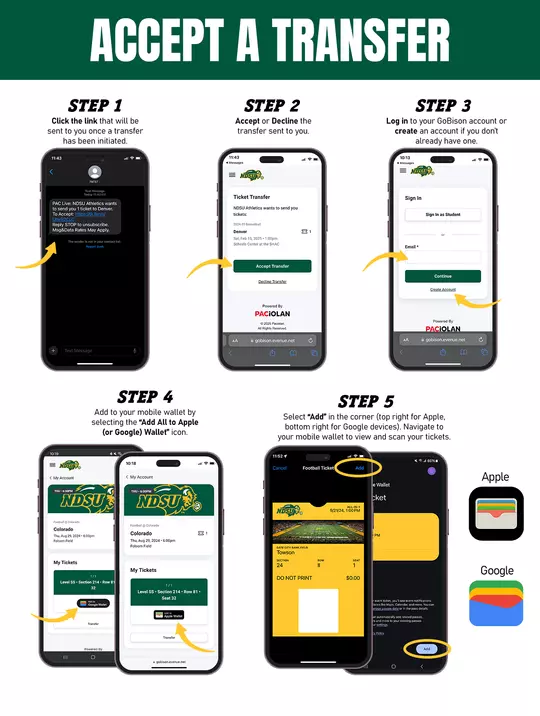
Yes, you can. With the text message they receive, they will be prompted to create an account if they don’t already have one. The recipient supplies first name, last name, phone number, email address, and chooses a password to create an account. They must have an account to complete and accept the ticket transfer.
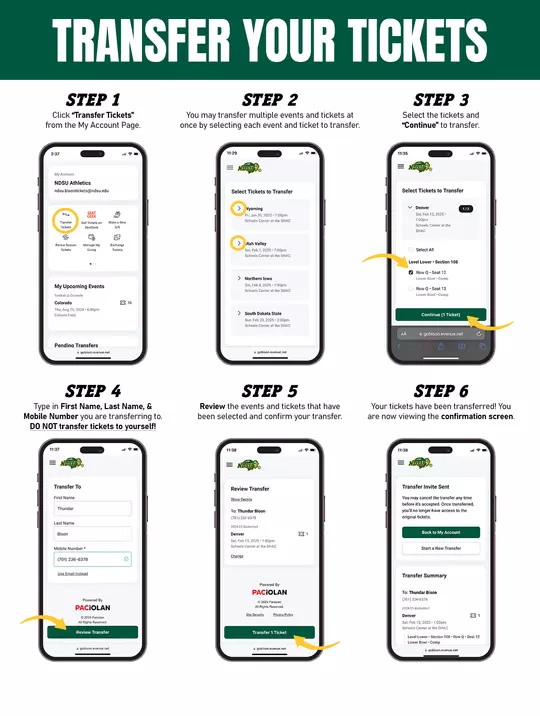
A ticket can be transferred multiple times before the start of the event. Once it is transferred it will be in the new user’s account and they will have the ability to transfer it if needed. A transfer can be canceled prior to it being completed and accepted by the recipient.
Yes, if the transfer has not yet been accepted by the recipient. You can do this when you are logged into your account.
There is no fee to transfer tickets (or receive) tickets from your account.
No. The confirmation text message or email does NOT act as a ticket. You will need to access an actual mobile ticket by clicking on the link in the text message or email you receive and then log in to your account, or if you do not have an account you will need to create one. Once you have an account, log in to GoBison.com/Tickets to access the mobile ticket and add it to your smartphone wallet.